
AI inference,
expressed in TypeScript.
Nola extends TypeScript with syntax that makes working with AI models feel native, much as async / await did for asynchronous code.
interface Person {
  name: string;
  age: number;
  job: string;
}

const person = await __nola.ask(__nola.intents.ExtractIntent<Person>({ instruction: `the described person`, type: __nola_type_$1(), loc: "9:20", def: "003caac216604817042c1c6224093f675c7dc0e320ffe2f546a096d033d3d89d" }), __nola_module_ctx());

console.log(person);

;
import { __nola } from "@nola-lang/runtime";
__nola.useRuntime(18);
function __nola_file_ctx() { return __nola.context.file("playground.tsi", 18); }
function __nola_module_ctx() { return __nola_file_ctx().module({ instruction: "Ada Lovelace, 36, worked with Charles Babbage on the Analytical Engine as a mathematician." }); }
function __nola_type_$1(): import("@nola-lang/runtime").InferType<unknown> { return __nola.types.ref("Person", __nola_type_Person); }
function __nola_type_Person(): import("@nola-lang/runtime").InferType<unknown> { return __nola.types.object({ name: __nola.types.string(), age: __nola.types.number(), job: __nola.types.string() }); }
`Ada Lovelace, 36, worked with Charles Babbage on the Analytical Engine as a mathematician.`;

interface Person {
  name: string;
  age: number;
  job: string;
}

const person = ask `the described person`<Person>;

console.log(person);
The playground uses hosted inference. No account or API key required.
Run it in the playground →Three constructs. The rest is TypeScript.
infer defines an AI model context boundary,
Intent<T> is what should be inferred inside it,
ask resolves it to a T.
Three constructs. Watch them assemble.
A running .tsi file in a minute
One command scaffolds a project that already runs, with a provider, your editor and your coding agent set up. Follow its prompts; it ends by opening the file to run.
The starter runs offline from a committed replay ledger, so the first run needs no API key. Pick nola: dev in the wizard for 25 free hosted runs, or a vendor and its key.
One type. One prompt. Zero glue.
An SDK call spreads one decision across a schema, a prompt, and a type that must stay in sync. Nola makes it a single typed expression that the compiler, editor, and runtime all understand.
A library reads a string. A compiler reads your program.
Every tab on the left is a function call. At runtime it sees a schema object and a prompt string, and nothing else. Nola is a compiler: it owns the parse of your .tsi and runs on TypeScript’s own type checker, so it sees the whole program around an ask — the type it must come back as, the values in its context, the expression it sits in. That is what derives the schema from your type, tells context from plain arguments, and lights up .tsi in your editor today.
It is also what lets the language grow where a library cannot follow: an if, a switch or a loop the model decides, as constructs the compiler understands rather than prompts you assemble. Those are on the roadmap, not in the release — but the parser and the checker they need already ship.
Same task, same model, on every tab. Samples follow each SDK’s current documentation, checked August 2026. The snippets are trimmed to the decision; the repo has each stack as a complete installable project.
Full runnable projects for every tab →There isn’t much to learn
Three constructs, one config file, and the tools for your bundler and IDE.
Context has a scope
infer frames what the model sees: a context window with a boundary you can point at. It exists at two levels. The file is one — its first statement, a bare string, is the instruction, and a top-level ask runs inside it. An infer function frames a context of its own, called from plain TypeScript like any other function.
Inside either, the dot is the whole API. A dot-prefixed parameter (.bio) or binding (const .tone = …) is context the model sees; a plain parameter stays an ordinary value — its name and type reach the model, its value never does.
A file, or a function. Context is a scope, not a string you assemble.
Context has a scope
infer frames what the model sees: a context window with a boundary you can point at. It exists at two levels. The file is one — its first statement, a bare string, is the instruction, and a top-level ask runs inside it. An infer function frames a context of its own, called from plain TypeScript like any other function.
Inside either, the dot is the whole API. A dot-prefixed parameter (.bio) or binding (const .tone = …) is context the model sees; a plain parameter stays an ordinary value — its name and type reach the model, its value never does.
A file, or a function. Context is a scope, not a string you assemble.
Every ask, on the record
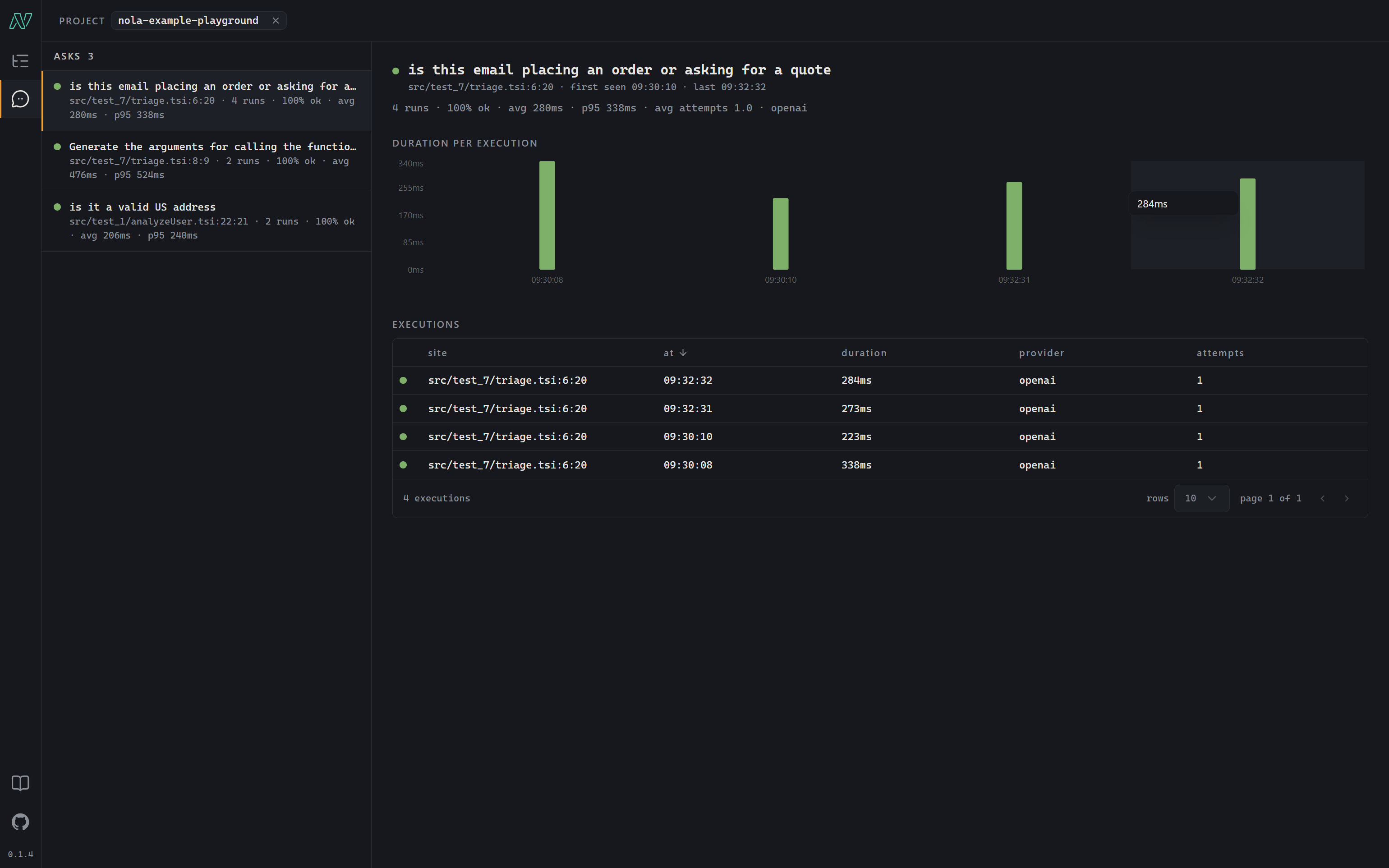
nola console is a local trace viewer. Run it, set telemetry: "http://127.0.0.1:4141" in your nola.config.ts, and every ask shows up as it resolves: grouped by project, by call, and by the line of .tsi that authored it.
What it records
The runtime already emits an event for each step of an ask and a receipt when it finishes. The console stores that stream in a per-machine SQLite file and lays it out as a tree:
- project
- the project key in nola.config.ts, defaulting to your package.json name — one console groups every app on the machine
- trace
- one top-level infer function call, with every nested call and ask underneath it
- ask
- one ask execution — the prompt as composed and as last sent, the JSON Schema it was checked against, which provider answered, the outcome, and how long it took
- attempt
- one provider round trip — a validation miss and its correction turn show up as two
The Asks view turns the tree sideways: every execution of one authored ask — keyed by its text and type, not its line number — with a duration chart, so a prompt you are tuning is one page.
Never in the way
- Ingestion is fire-and-forget. A console that is down warns once and never blocks, slows or fails an ask; one that comes back mid-run picks the stream up again.
- Loopback only, and content is redacted before it leaves the process. Pointing at a non-local host prints a notice naming it.
- No agent, no SDK. NOLA_TRACING_URL attaches one run with zero config; for something permanent, list the URL under telemetry — and delete the line to turn it off.
The same events reach your own code: list an observer with any of onAskStart … onInvocationEnd under telemetry, or set telemetry: { level: "debug" } for the built-in terminal trace. Observers only observe — one that throws can never break an ask.
JSX made markup a language feature. Nola does the same for inference. A .tsi file reads like TypeScript — but tsc never sees it: Nola owns the parse, lowers every ask to plain TS, and a provider fills in the type at run time.
write → lower → resolve
Every .tsi file goes through three phases, and only the first one is yours. You write TypeScript with infer and ask in it; the toolchain and the runtime take it from there. No schema DSL, no graph builder, no prompt library.
You write it in .tsi
It is still TypeScript, so everything you know still applies. Put what the model should see in the file’s first string or a dot-prefixed parameter (.message), and write ask `prompt`<T> where you want a value back — at the top of a file, or inside an infer function you import from anywhere. That is your whole job.
Nola lowers it to plain TS
Before tsc, your bundler, Node or your editor ever sees it, the toolchain turns the .tsi into ordinary TypeScript with a source map, the way JSX is compiled away. The JSON Schema for every <T> is worked out from your types right there. Nothing to write by hand: the loader, nola build and the bundler plugins do it.
A provider resolves it
Nothing has run yet: an Intent<T> is just the request. When ask resolves it — or plain TypeScript awaits an infer function — the runtime puts the context together, calls the provider from your config, checks the reply against the schema, gives a wrong-shaped reply one chance to correct itself, and hands you a real T. Every ask leaves a receipt.
“Just plain TypeScript, as far as I can tell.”
“I bundled it. Didn’t notice a thing.”
“Thenable. I awaited it. No further questions.”
“Breakpoints bound on the first try.”
Stop wiring prompts. Start writing types.
Scaffold a project in one command — it runs offline out of the box, so you can read, edit and re-run .tsi before you ever paste an API key.